
The JSON viewer and editor developers actually want to use
Fast, beautiful, and surprisingly powerful. See your JSON structure, edit with precision, and find anything instantly — all in one delightful tool.
Developers work with JSON constantly. Why are the tools so bad?
Too Cluttered
Feature-bloated tools are slow, overwhelming, and distract from what you're actually trying to do.
Out of Sync
Edit in tree view, text doesn't update. Fix something in text, tree breaks. Constant context switching.
Painfully Slow
Open a large JSON file and watch your tool freeze. Or crash. Or both.
SnappyJSON fixes all of this.
Everything you need. Nothing you don't.
Thoughtfully designed features that make working with JSON a joy.
Two-Pane Layout
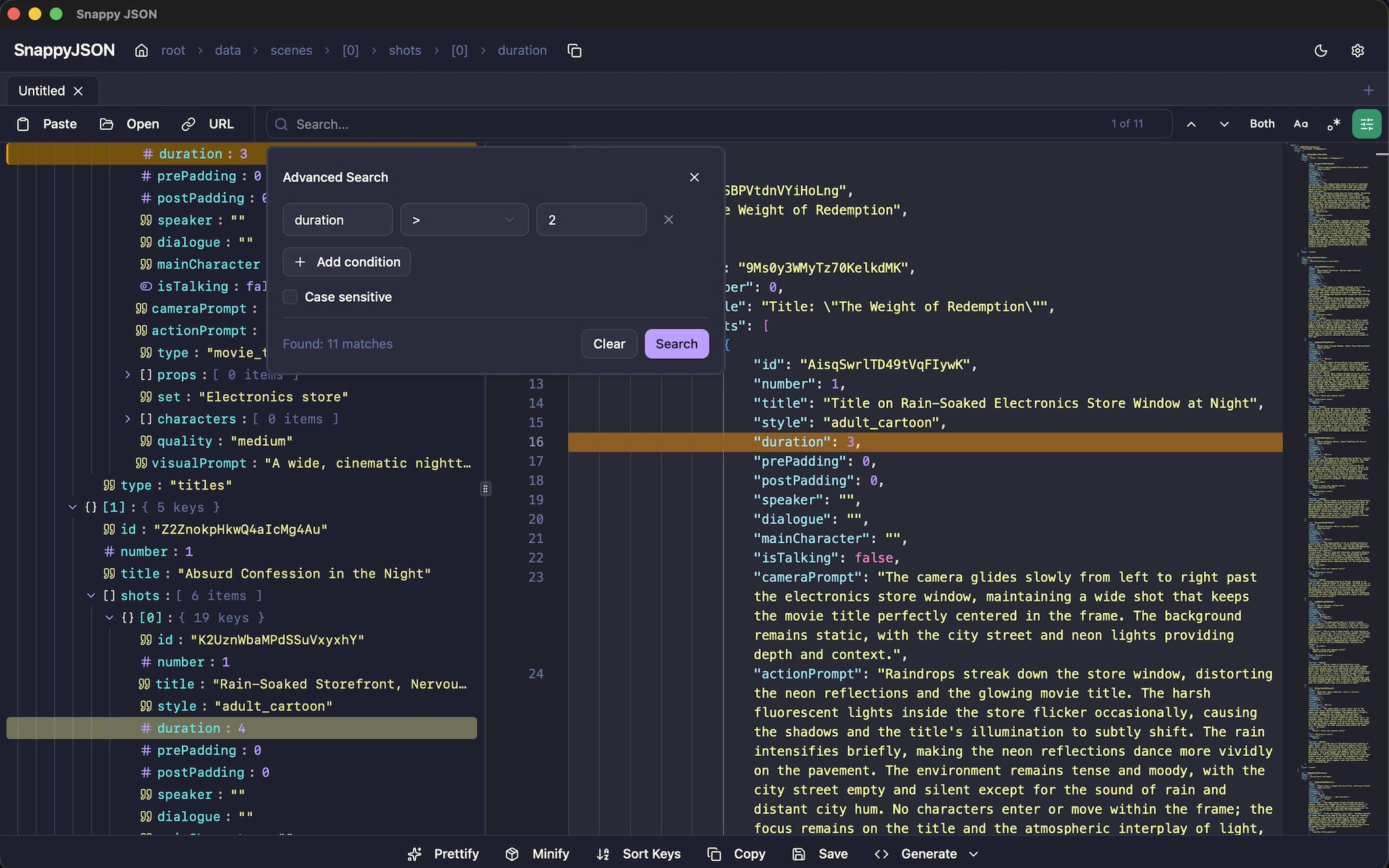
Tree navigator on the left, Monaco editor on the right. See structure and raw text simultaneously. Resize to match your workflow.
Live Bidirectional Sync
Edit in the tree, see it update in the text. Fix a typo in the editor, tree reflects it instantly. No save buttons needed.
Smart Search
Find any key or value instantly. Use regex, case-sensitive, or build advanced queries like 'price > 30 AND status equals active'.
Path Navigation
Always know where you are with the breadcrumb bar. Click to zoom in. Copy the full JSON path with one click.
Transform Tools
Prettify, minify, or sort keys with one click. Get your JSON formatted exactly how you need it.
TypeScript Generation
Turn your JSON into TypeScript interfaces instantly. Copy to clipboard and keep building.
See structure. Edit text. Stay perfectly in sync.
The two-pane layout with live bidirectional sync is what makes SnappyJSON special. Navigate visually in the tree, edit precisely in text — both views update in real-time. No other tool does this as smoothly.
Live Sync
Multi-Tab Support
Work with multiple JSON documents.
Compare files, manage related configs, switch with Cmd+1-9. Just like your favorite code editor.
Beautiful Themes
Match your editor aesthetic.
7+ carefully crafted themes including Dark, Light, Monokai, Dracula, Nord, and Solarized. Syncs with your system preference.
Multiple Input Methods
Get JSON in however you like.
Paste from clipboard, open from file, drag and drop, or fetch from any URL. Zero friction getting your data into the tool.
Built for Speed
- Handles files up to 10MB smoothly
- Lazy-loaded tree prevents UI freezes
- < 150ms interaction delay target
- Native Mac app — not Electron bloat
Privacy First
- 100% local processing
- Your JSON never leaves your machine
- No cloud uploads
- No telemetry or tracking
- No account required
Built for developers who work with JSON every day
Software Developers
Debug API responses, edit config files, understand data structures.
DevOps Engineers
Inspect logs, edit deployment configurations, validate JSON payloads.
QA Engineers
Check API output, compare expected vs actual responses, explore test data.
Data Engineers
Explore JSON datasets, transform data, clean messy exports.
Every action accessible via shortcuts.
Work at the speed of thought.
Free. Forever.
SnappyJSON is completely free to use. No subscriptions, no premium tiers, no feature limits. Just download and start using it.
Download for MacFrequently Asked Questions
Ready to make JSON delightful?
Download SnappyJSON for Mac or try it in your browser. It's free.